
Copyright WMS.Studio
WMS.Studio provides advanced Warehouse Management Software (WMS) solutions for automated warehouses, supporting vertical lift systems from leading manufacturers such as Hanel, Kardex, Modula, Logimat, Weland, and more.
This manual is designed for developers and integrators who wish to connect external host systems to the mpx platform. Our API enables seamless, reliable, and secure data exchange for inventory, job management, and goods receipt operations.
Integration options include:
The following sections provide detailed instructions and examples for each integration method, along with best practices and troubleshooting tips.
When a new article is created or updated in the host application, send the information to mpx to keep both systems synchronized.
If the file contains an article code not in the mpx database, a new article is created. If the code exists, the product is updated.
The file name must have the extension .ITM.
Format:
Article, title, description, uom, barcode, imageExample file (sample.ITM):
abc123, Sample Item 1, This is a sample item, Each, 947573, http://domainname.com/images/abc123.jpg
abc456, Sample Item 2, This is another sample item, Each, 433345, http://domainname.com/images/abc456.jpg
Note: Limit image file size to 150x150 pixels. Larger files, especially on remote servers, may slow down page load times.
The job file allows the host to send mpx a list of items to be picked (pick list or pick sheet). Each file
can contain multiple pick lists, and the file name must use the extension .JOB.
Format:
job name, customer, article, batch code, quantityExample file (sample.JOB):
Job ABC, Universal Exports, abc123,,31
Job ABC, Universal Exports, abc456,,44
Job DEF, Acme Inc, abc123,rr1,3
Job DEF, Acme Inc, abc456,32456-32,3
Goods in (putaway) is the process of storing items in the lift using the purchase order generated by the host system.
When a delivery note or purchase order is created in the host, it can be sent to mpx so that when the parts arrive they can be put away/stored in the lift.
The file name must use the extension .GRN.
Format:
purchase order, supplier, article, quantityExample file (sample.GRN):
Order 123, Bobs Stuff, abc123,10
Order 123, Bobs Stuff, abc456,21
Order 123, Bobs Stuff, abc789,15
Order 123, Bobs Stuff, abc012,5
PLEASE NOTE that the SOAP API is to be retired, and new projects should use the RESTful JSON API instead. Support for SOAP is only avaialbe to existing implementations.
The SOAP API provides a robust, structured interface for advanced integration with mpx. It is suitable for enterprise systems requiring strict data validation and transactional operations.
<soapenv:Envelope xmlns:soapenv="http://schemas.xmlsoap.org/soap/envelope/" xmlns:mpx="http://wms.studio/api">
   <soapenv:Header/>
   <soapenv:Body>
      <mpx:CreateJob>
         <JobName>Job ABC</JobName>
         <Customer>Universal Exports</Customer>
         <Article>abc123</Article>
         <Quantity>31</Quantity>
      </mpx:CreateJob>
   </soapenv:Body>
</soapenv:Envelope>
Refer to your WSDL documentation for a full list of operations and required fields.
The RESTful JSON API offers a modern, flexible interface for integrating with mpx using standard HTTP methods and JSON payloads. It is ideal for web and mobile applications.
GET, POST, PUT, and DELETE as appropriate.POST /api/jobs
Content-Type: application/json
Authorization: Bearer <your_token>
{
"jobName": "Job ABC",
"customer": "Universal Exports",
"article": "abc123",
"quantity": 31
}
The RESTful JSON API is self documented using SWAGGER, and the Swagger web site can be accessed via clicking here
The SQL Bridge provides a way to interact with the mpx database using standard SQL queries with a direct SQL connection to the database. This allows for greater flexibility and ease of integration with existing SQL Server-based systems.
The wms.Studio platform is built for Microsoft SQL Server 2017 or above. In 2026, and with the expected release of SQL Server 2025, support for new SQL features and improvements will be included.
Below are the key tables required for integration via SQL Bridge.
Whilst its possible to insert data directly into the SQL tables, we recommend using the stored procedures we provide to ensure data integrity and consistency.
To create a basic database that contains the key tables and stored procedures for testing purposes, contact wms.Studio or your partner to obtain the necessary SQL scripts.
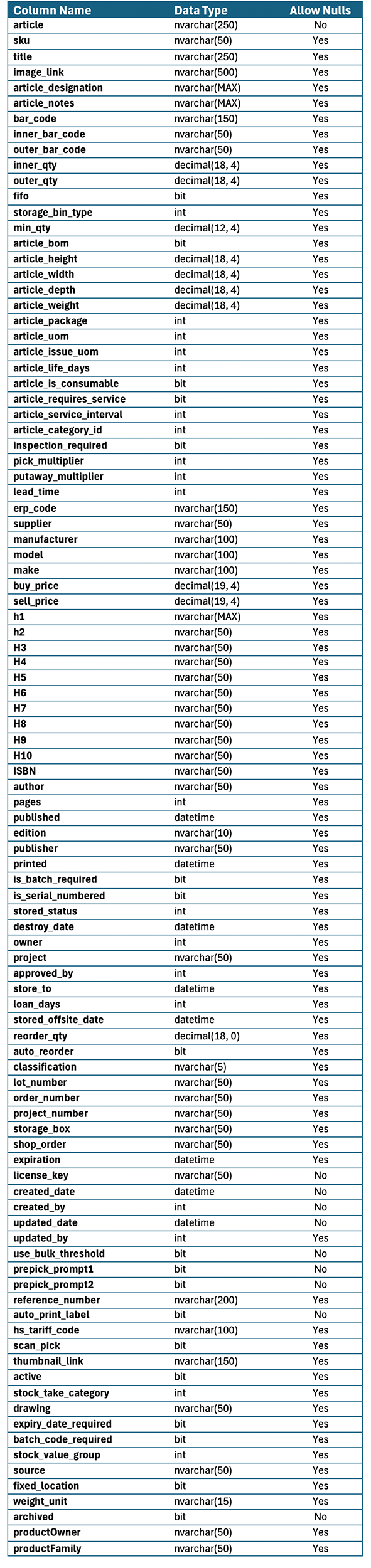
The Article table stores information about articles that can be included in jobs and stored in the warehouse. Typically this table contains the master list of all possible articles to be stored in the warehouse.
This table includes fields such as ArticleCode, Title, Description, UOM (Unit of Measure), Barcode, and ImageURL which typically make up the key attributes of an article that are required. Other fields are available but are not required, but can greatly enhance the article's metadata for use in reports and WMS/360 dashboards.
The only mandatory fields are article, license_key, created_date, created_by and article_uom.
Key points about tbl_article table.
Usage Example:
-- Example SQL query to insert a new article into the mpx database
INSERT INTO tbl_article (Article, Title, UOM, Barcode, ImageURL)
VALUES ('abc123', 'Sample Item 1', 1, '947573', 'http://domainname.com/images/abc123.jpg');
Table Map
The tbl_job table stores information about jobs that are created in the system, while the tbl_pick table stores information about picking tasks associated with the jobs.
When a new job is created, a record is inserted into the tbl_job table with details such as Job Name, Customer, Priority and Status. Each job can have multiple picking tasks associated with it, which are stored in the tbl_pick table. The tbl_pick table includes fields such as job_id (linking to tbl_job), Article (linking to tbl_article), Quantity, and completed(status).
Key points about tbl_job table:
Key points about tbl_pick table:
Usage Example:
-- Example SQL query to insert a new job into the mpx database
INSERT INTO Jobs (JobName, Customer, priority)
VALUES ('ABC123', 'Universal Exports', 10);
select @job_id as inserted_job_id;-- Example SQL query to insert related job picks into the mpx database
INSERT INTO tbl_pick (job_id, Article, Quantity)
VALUES (@job_id, 'article123', 5);
The tbl_goodsin table stores information about goods that are to be received into the warehouse.
Typically the records in this table are created when a purchase order is raised in the host, or the supplier of the goods provides a delivery note.
When goods are received, the record is updated in the tbl_goodsin table with details such as received time stamps, completed and status flags. Each goods receipt can have multiple line items associated with it, which are stored in the tbl_goodsin_items table.
Key points about tbl_goodsin table:
Usage Example:
-- Example SQL query to insert a new job into the mpx database
INSERT INTO tbl_goodsin (purchase_order, supplier, supplier_name, article, quantity, line_number)
VALUES ('PO ABC', 'UNEXP', 'Universal Exports', 'abc123', 31, 1);
The tbl_binarticle table stores information about articles (products) that are stored in bins within the warehouse. Each article can be associated with multiple bins, and the tbl_binarticle table helps manage this relationship.
The bin_id is used to link to tbl_location, which contains information about the physical locations of the bins within the warehouse.
When a shelf map is assigned to a shelf, the bins are mapped to their respective locations on the shelf. Initially the bin will exist with a null article value unitl a specific article is pre-assigned to the bin, or the operator does a article put operation to an empty bin, when it will then be linked to the article.
multi-use bins are where there is a one to many relationship between the tbl_location.bin_id and tbl_binarticle.bin_id. There will be one record in tbl_location and multiple records in tbl_binarticle.
Key points about tbl_binarticle table:
Usage Example:
-- Example SQL query to insert a new article into the mpx database
INSERT INTO tbl_binarticle (ArticleID, BinID, Quantity)
VALUES (1, 101, 50);
If you need help, have questions, or require additional examples, our developer support team is here to assist you.
We recommend reviewing the documentation and FAQ before reaching out, as many common questions are answered there.